
Media server for immersive spaces
TholusOS
Eight projectors. One control room. TholusOS brings playback, warp, blending, content and remote control into one system made for everyday operation.
Free · €0 Coming soon for Mac.
Software licence, hardware, and installation/calibration are three separate components.
Less rack. More control.
From one projector to an immersive room, technical setup and daily operation stay in the same environment.
Set projection mode, mapping, quality and projector maintenance.
Automatic camera-based blending
The surface changes. Calibration adapts.
Fulldome, cylinder, flat wall or custom geometry: TholusOS reads projected patterns and prepares warp, blend and black-level compensation for every output.
Fulldome
Complete domes and dome segments.
Cylindrical
Curved walls and 180° or 360° spaces.
Flat wall
Screens, walls and planar surfaces.
Custom
UV meshes and manual points for special geometries.
- 01
Frame
The camera sees the whole surface and each projector’s patterns.
- 02
Calibrate
TholusOS reconstructs geometry, overlaps and dark-scene response.
- 03
Apply
Warp, blend and black level become dedicated maps for every output.
TholusOS
Everything you need. One system.
TholusOS combines multi-projection, playback, and daily operations. Set up the room once, then let the team open, schedule, and control it without rebuilding the workflow.
More accessible blending
Align geometry, overlaps, black levels, and colour with a Mac mini, a compatible video controller, and projectors suited to multi-projection.
More than mapping
Content, playlists, preload, crossfades, loops, and immersive formats live in the same control room.
Easy for the whole team
Staff manage schedules, content, and playback without working directly on the media server.
Inside TholusOS
The app is the control room.
Calibration, content, shows and remote management: every view leads to a precise action.
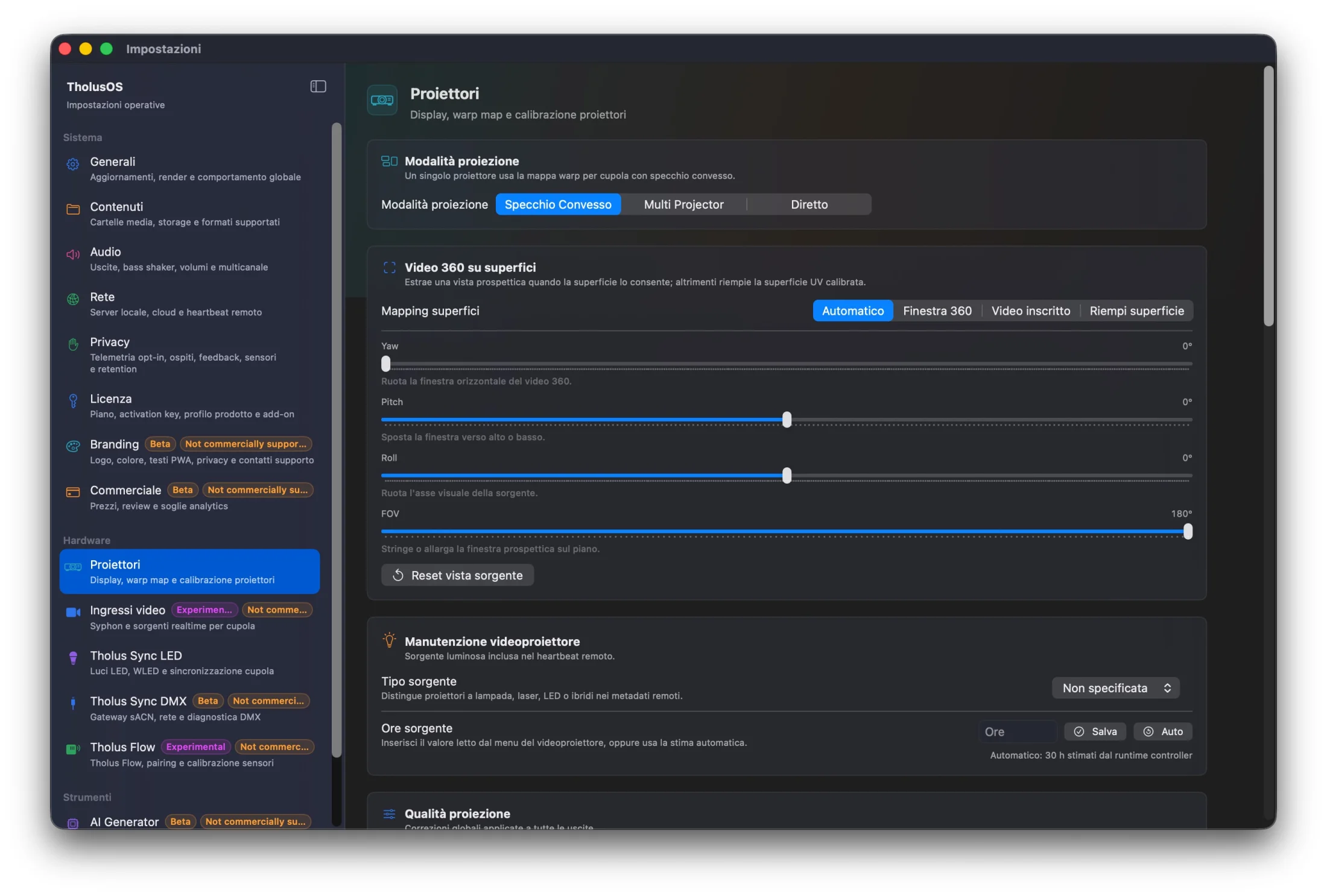
Calibrate surfaces
Set projection mode, mapping, quality and projector maintenance.
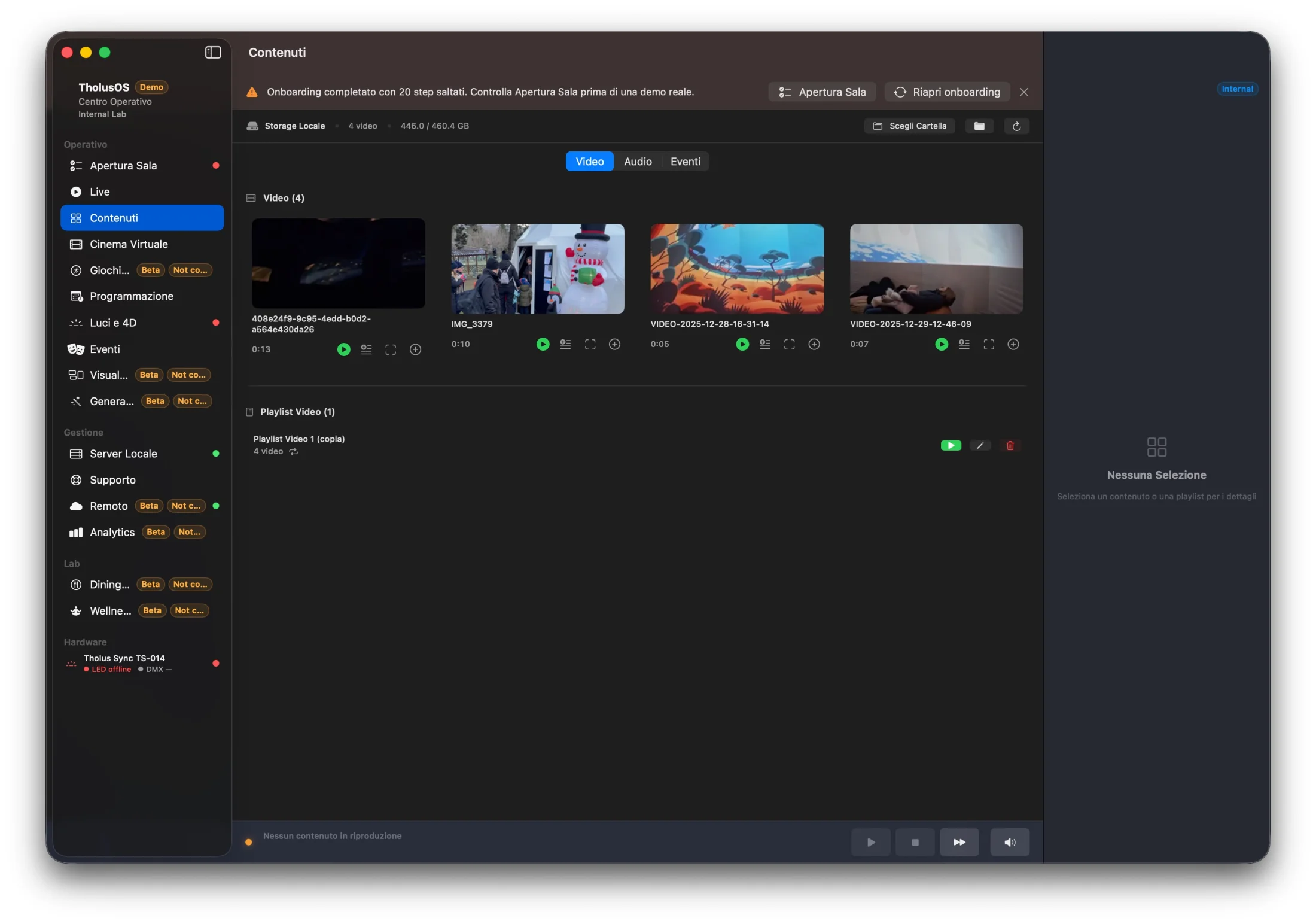
Organise content
Video, audio, events and playlists stay in the venue’s local library.
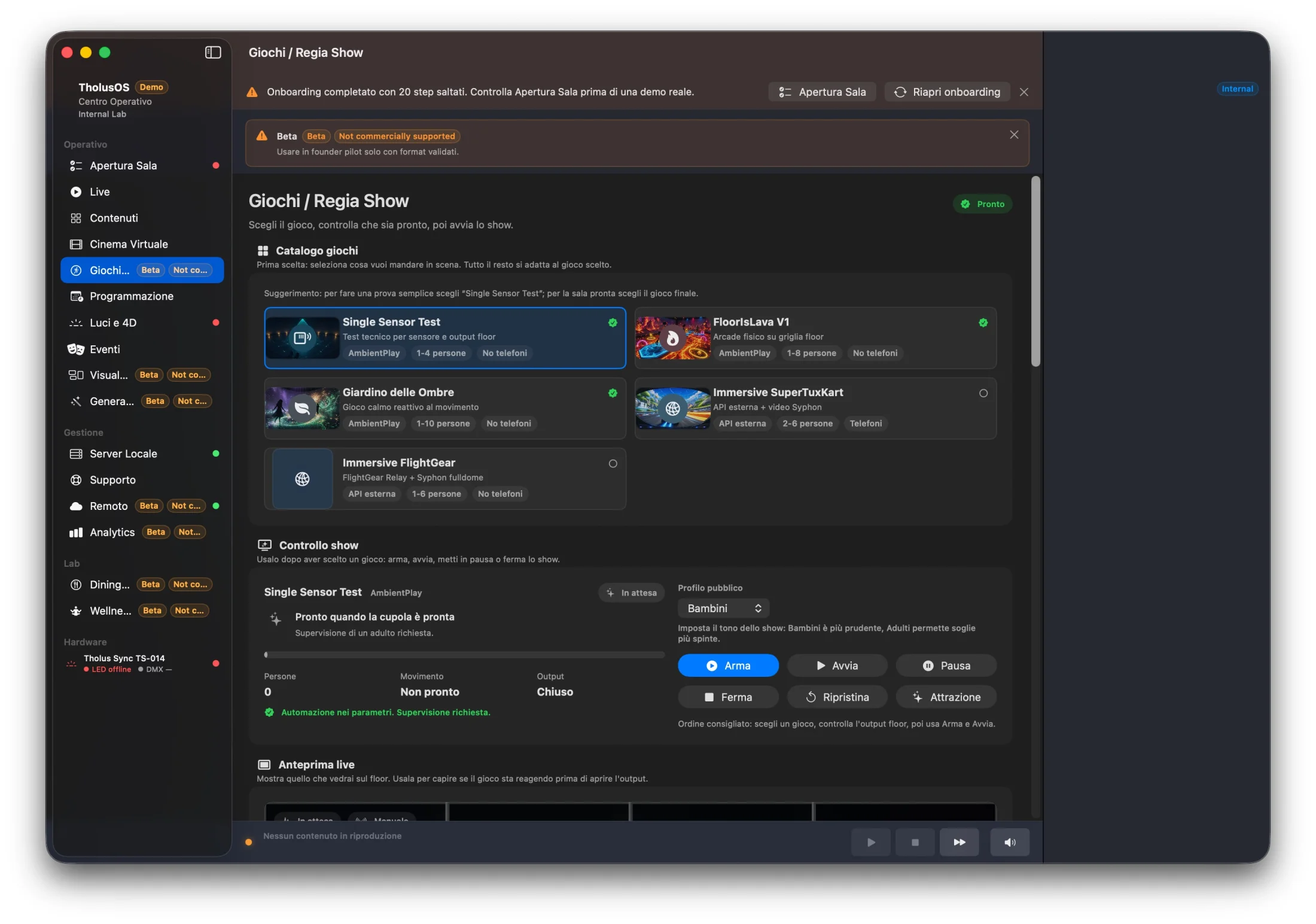
Run the show
Staff select an experience, check readiness and control the session.
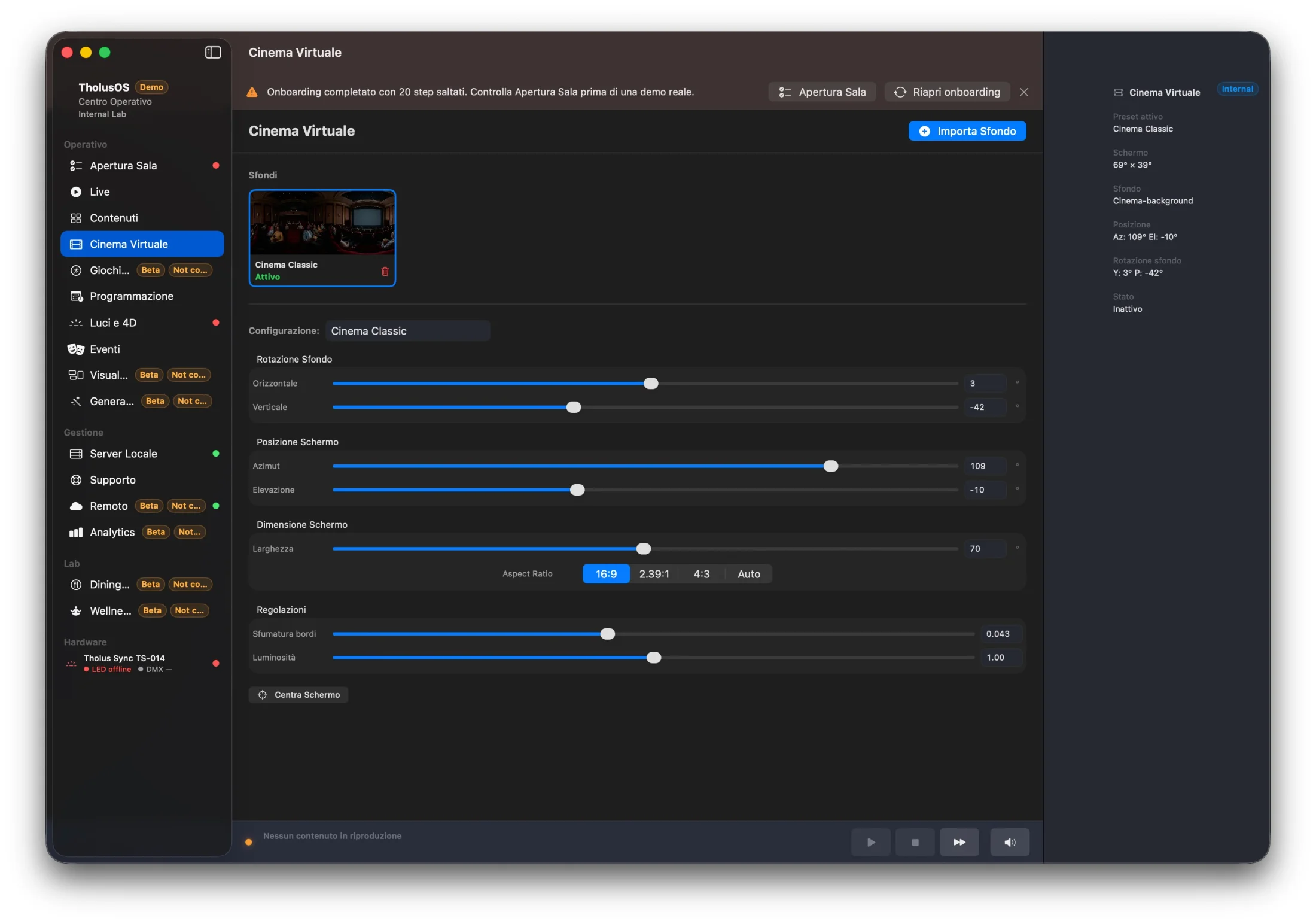
Build virtual cinemas
Position, size, ratio and edge feathering are adjusted in one panel.
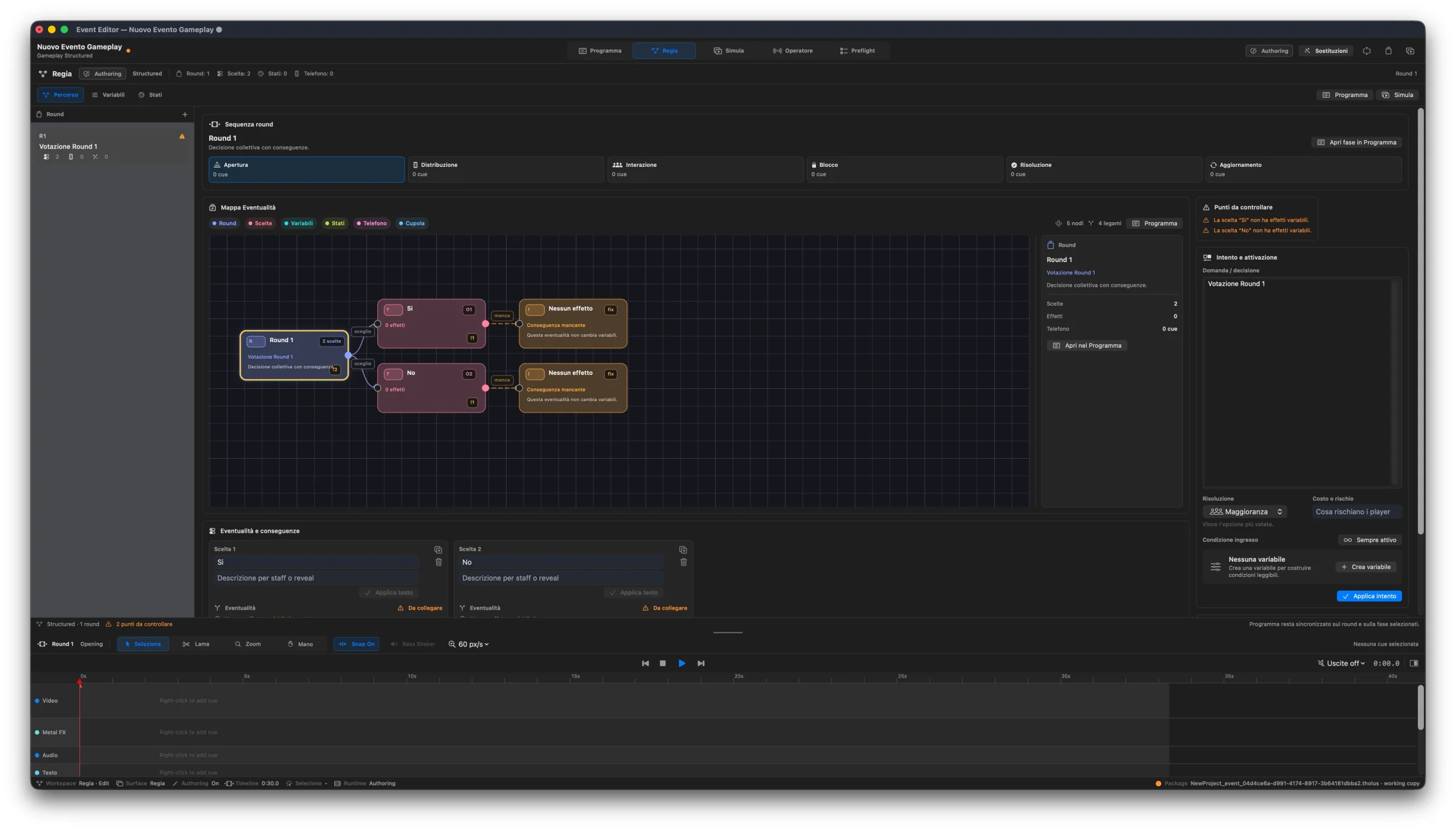
Create interactive experiences
Timeline, logic, states and event direction live in a visual editor.
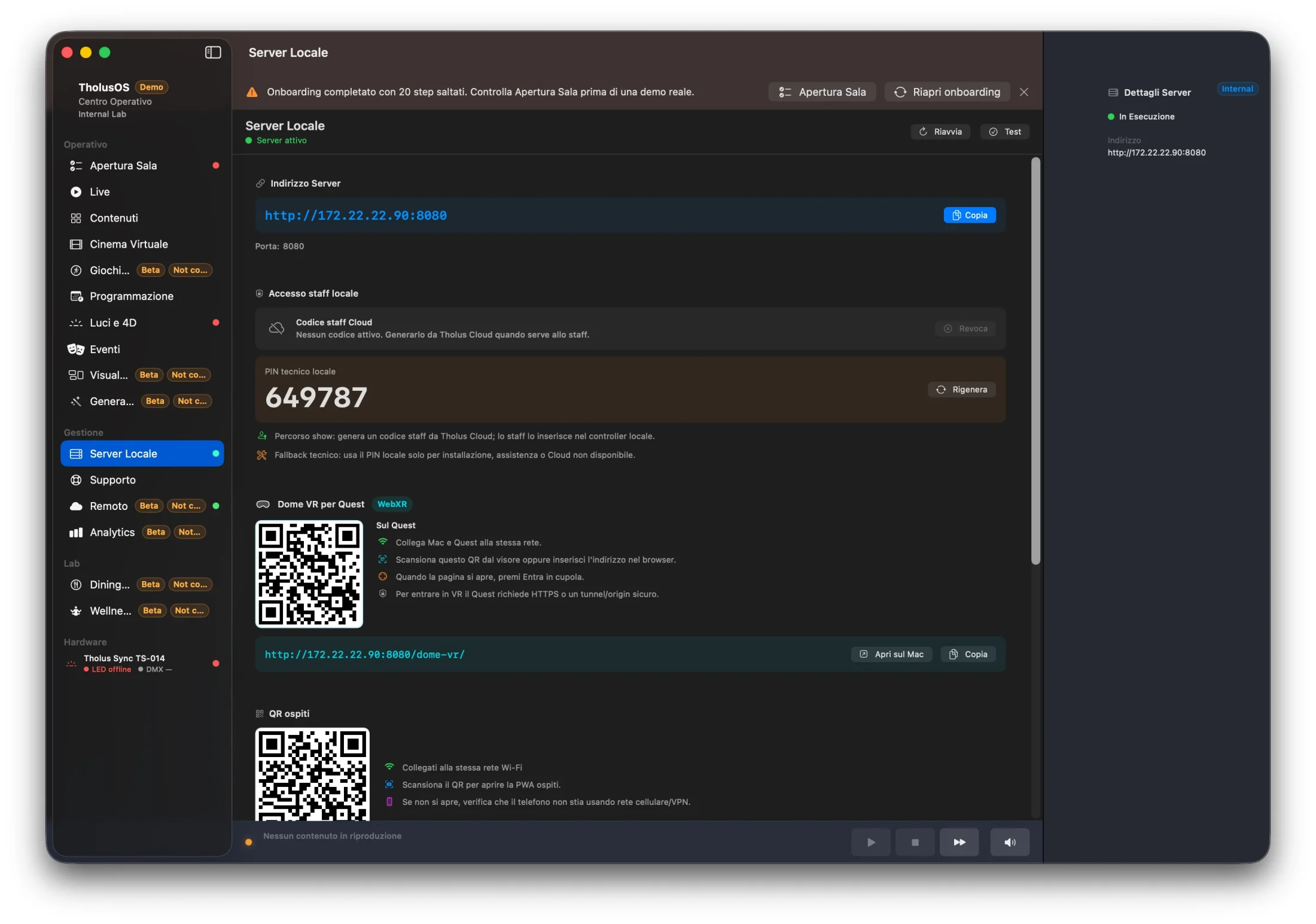
Work locally too
Server, staff access, guests and devices remain reachable inside the venue.
From design to opening
Set it up once. Run it every day.
- 01
Connect
Mac, compatible video controller and projectors become one synchronised canvas.
- 02
Calibrate
Warp, edge blending, black level and colour are prepared with a guided workflow.
- 03
Schedule
Load media and playlists, then assign days, times and events.
- 04
Open
Staff start the room from a simple panel with dedicated roles and controls.
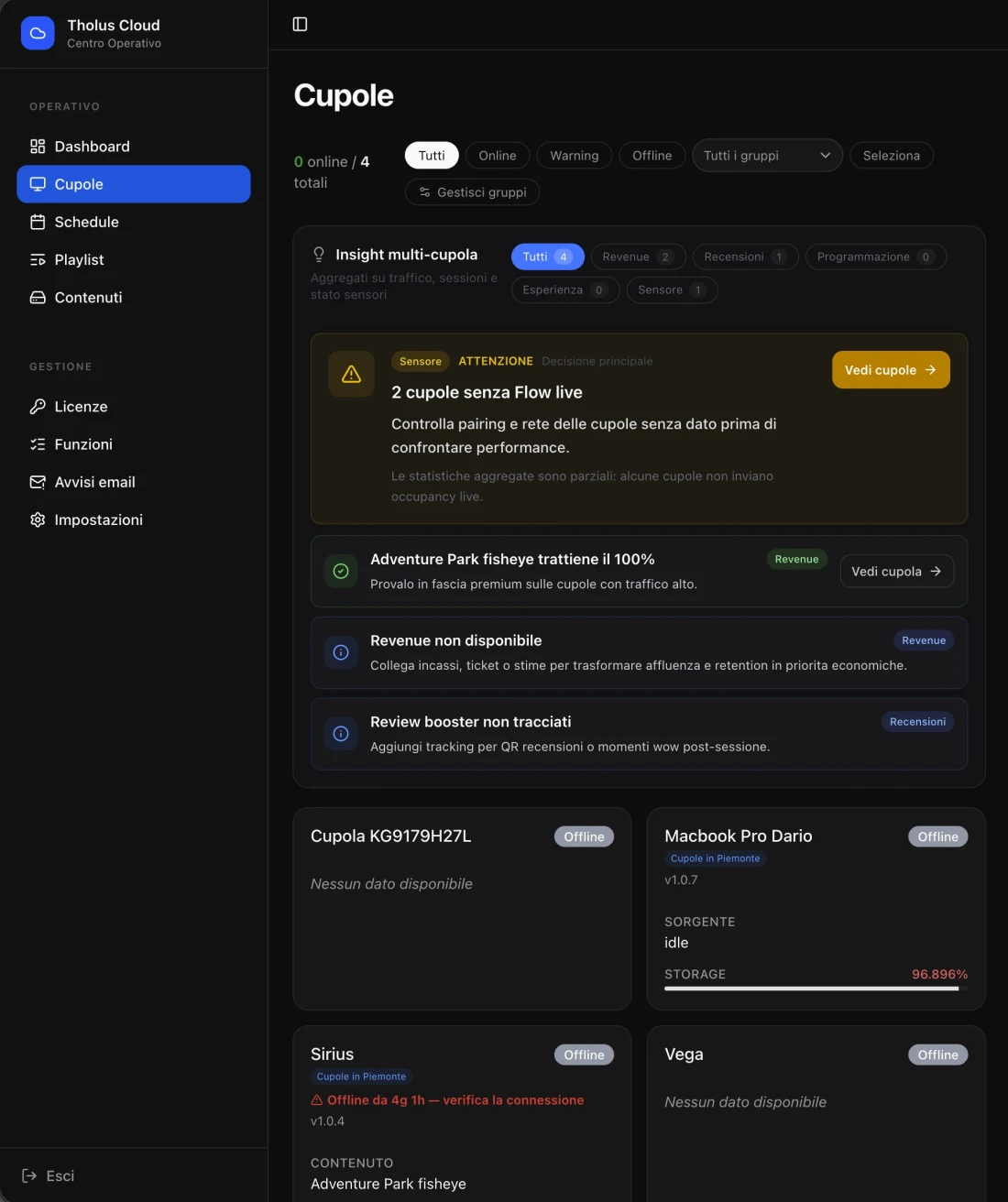
Tholus Cloud
The room stays under control. Even from afar.
Multiple people can manage content, schedules and system status without working directly on the media server.
- Separate administrator and operator access
- Manage multiple venues from one panel
- Status, alerts and diagnostics at a glance
- Local server remains available inside the venue
Where it works
One system. Different spaces.
Immersive rooms
Panoramic walls, showrooms and multi-projector experience rooms.
Museums
Stable scheduling, updateable content and staff operation.
Domes
Domemaster, 360°, mirror dome and immersive formats in one playback system.
Hospitality
Bookable experiences, virtual cinema and remotely managed environments.
Attractions
Shows, games, sensors and interactions integrated into the control room.
Compact architecture
A Mac mini can become a media server with up to 8 outputs.
Blending two to eight projectors requires a compatible video controller. It creates synchronised outputs from the same canvas and prevents visible discontinuities in moving images.
TholusOS
Multi-projector, without the complexity.
Outputs, calibration, and playback stay in the same project, from one surface to an immersive room with 8 projectors.
- Custom layouts from one to eight projection regions.
- Warp, edge blending, black-level compensation, and colour correction.
- Assisted calibration profiles for consumer, standard, and metric setups.
- Standard, equirectangular, domemaster, and mirror-dome output.
- Local playback with preload, crossfade, loop, seek, and hold-last-frame.
- Blending from two to eight projectors requires a compatible video controller: separate native Mac mini outputs are not genlocked.
Licences per media server
Start with the features you need.
Free gets you started, Core automates a small installation, Pro runs an immersive room, and Enterprise manages multiple sites. Subscription plans are available monthly or for 12 months at the price of 10.
1. TholusOS software licence
Each plan defines the features and number of active media servers. Mac, video controller, projectors, installation, and calibration are purchased separately.
Free
€0 No expiryFor starting to project and preparing content on your own Mac.
- 1 output up to Full HD
- Library, playlists, loops, and manual playback
- Commercial use with no watermark
- Documentation support
Core
€19 / month €190 / 12 monthsFor a small installation that needs to open, play, and run its schedule every day.
- 1 output at resolutions validated for the Mac
- Fulldome and 360° formats, manual warp and colour
- Scheduler and local staff panel
- Software support by email
Pro
€49 / month €490 / 12 monthsFor immersive rooms, planetariums, and interactive multi-projector experiences.
- Up to 8 outputs with compatible hardware
- Edge blending, black level, and camera calibration
- Event control, phone interactions, Cloud, and analytics
- Priority software support by email
Enterprise
From €149 / month From €1,490 / 12 monthsFor organisations and integrators coordinating several installations.
- 3 Pro media servers included
- Central management, permissions, and aggregated diagnostics
- Customisable operator panel; extra servers at €39 / month or €390 / year
- Support scope and SLA defined in the offer
Compare plans
Prices, operating capabilities, and support at a glance.
| Feature | Free | Core | Pro | Enterprise |
|---|---|---|---|---|
| Monthly price | €0 | €19 / month | €49 / month | From €149 / month |
| 12-month payment | No expiry | €190 / 12 months | €490 / 12 months | From €1,490 / 12 months |
| Active media servers | 1 | 1 | 1 | 3 |
| Video outputs | 1 up to Full HD | 1 | Up to 8 | Up to 8 per server |
| Scheduler and staff panel | Not included | Included | Included | Included |
| Fulldome, 360°, warp, and colour | Not included | Manual | Manual and camera-based | Manual and camera-based |
| Edge blending and black level | Not included | Not included | Included | Included |
| Event control, Cloud, and analytics | Not included | Not included | Included | Included |
| Central multi-site management | Not included | Not included | Not included | Included |
| Software support | Documentation | Priority email | Scope and SLA in the offer |
30 days of Pro, with no credit card.
Contact us for trial availability and activation details. At the end, choose a plan or return to Free while keeping projects, content, and settings.
TholusOS Pro Founders
€29 / month · €290 for the first yearFor the first 50 Pro licences purchased within 90 days of commercial availability. From month 13, the price is €49 / month or €490 / year; it cannot be combined with other discounts.
How the licence works
- Buying a dome from the usual neXt includes a perpetual TholusOS Pro licence and 12 months of updates. After those 12 months, you can keep using the version you acquired; an optional subscription provides access to subsequent updates.
- Core and Pro include one active media server with no per-operator or per-visitor fees. Enterprise includes three Pro media servers.
- A second Mac can prepare projects; simultaneous playback on another system requires another licence.
- During the paid term, local playback continues without an internet connection and does not require an online check at every launch.
- When a subscription expires, features of the expired plan cannot start new sessions. A session already in progress may continue until it ends, but no later than 24 hours after expiry. The installation then uses Free features, keeping projects, content, and settings.
- Custom development, ongoing assistance, and SLAs are quoted separately.
2. Hardware, only if you need it.
Use a compatible Mac or choose the ready media server: a base-model Mac mini, BTSX controller, and TholusOS Pro configured as one system. Blending from 2 to 8 projectors requires a compatible video controller.
Ready TholusOS media server
€2,600 + VATA preconfigured system based on the base Mac mini available when you order, with a BTSX controller and 12 months of TholusOS Pro.
- Configured and tested base Mac mini
- BTSX controller for up to 8 synchronised outputs
- 12 months of TholusOS Pro
BTSX controller
€600 + VATThe controller sits between a compatible media server and the projectors, providing up to 8 synchronised outputs for blending.
- BTSX controller
- Up to 8 video outputs
- Media server and TholusOS not included
3. Setup, installation, and calibration
Remote setup on a compatible system lasts up to 90 minutes. On-site assessment, installation, calibration, training, and show production are quoted for each project.
- Remote setup up to 90 minutes: €199 + VAT
- On-site installation and calibration: quoted separately
- Custom training and show production: quoted separately
All prices exclude VAT; 12-month plans are paid in advance. Projectors, installation, and on-site calibration are not included with the software or media server. Effective output count depends on resolution, frame rate, and content.
Before installation
Questions before designing the system
Can I connect two projectors directly to the Mac mini?
For independent images, yes. For one continuous edge-blended image, no: separate native Mac mini outputs are not genlocked. The projectors can refresh at different instants, revealing tearing or discontinuities in moving content. Any blended system from two projectors onward therefore needs a compatible video controller that derives synchronised outputs from the same canvas.
What does the BTSX controller do?
BTSX receives the media-server canvas and divides it into as many as 8 synchronised outputs. Total resolution and frame rate must be chosen before installation for the content and projector count.
What contrast ratio should the projectors have?
For deeper blacks and less visible overlap, we recommend a real native or static contrast ratio of at least 2,000:1, preferably higher. Compare values measured with the same method, not dynamic-contrast claims in the hundreds of thousands or millions to one: those depend on an iris or light source changing between scenes and do not describe the simultaneous black performance required for a blend.
Can I use inexpensive projectors?
Yes, if they are chosen for static contrast, brightness in the colour mode you will actually use, suitable optics, stable inputs, and available overlap. High lumen output or a huge dynamic-contrast figure cannot compensate for raised blacks, poor uniformity, or the wrong lens.
Do all projectors need to be identical?
Using the same model and lens, consistent firmware, and light sources with similar operating hours is strongly recommended. TholusOS can correct geometry, gamma, black level, and colour, but it cannot fully remove large physical differences between projectors.
How do I prepare a stable blend?
Plan optical overlap before mounting. Run every projector at the same resolution, refresh rate, colour mode, and light-source setting. Disable dynamic contrast, automatic brightness, and self-adjusting corrections during calibration, then inspect white, solid colours, dark scenes, and real moving content.
Why can a seam appear in dark scenes?
A projector cannot emit absolute black, so the black floors of both images add together in the overlap. Compensation can even out the area, but it cannot create a black deeper than the projectors, screen surface, and ambient light allow. This is why static contrast and uniformity matter.
Is TholusOS only projection-mapping software?
No. It is a media server for permanent installations, combining mapping with playback, content, playlists, scheduling, commands, diagnostics, and remote operation.
Can several people manage the venue?
Yes. The remote console provides administrator and operator access, so the team can work from a browser without using the Mac connected to the projectors.
Which content formats are supported?
Standard, equirectangular and 360° video, domemaster or fisheye, mirror-dome workflows, playlists, and interactive Tholus experiences.
TholusOS
Bring TholusOS to your space.
Leave your name and email to hear when it becomes available, or tell us about your system.